

For most U.S. amateur events, the right baseline is net, flighted stroke play with USGA Handicap Index-based net scoring and predefined tiebreak rules published before registration opens. That single decision covers fairness, verifiability, and player trust in one move. Before you do anything else:
- Confirm handicap eligibility and flighting method. Decide whether you'll use fixed handicap bands (A, B, C, and D bands based on handicap ranges) here or even splits after entries close. Require a current USGA Handicap Index for entry, so net scoring is consistent across the field.
- Set tiebreak rules and choose your scoring platform before registration opens. Count-back order (last 9, last 6, last 3, 18th hole) is the standard when a playoff isn't feasible. Lock that in writing, publish it on the event page, and configure it in your platform before a single player registers.
Net scoring levels mixed-skill fields because it removes raw ability as the only variable. It's also simple to verify: signed scorecards, a defined scoring area, and a single results verifier are all you need to close out a clean event.
Key Takeaways
A net, flighted stroke-play format with USGA Handicap Index-based scoring and pre-published tiebreak rules is the most reliable foundation for a fair, dispute-free amateur tournament.
| Point | Details |
|---|---|
| Net scoring levels the field | Gross minus course handicap lets players of all skill levels compete fairly on the same leaderboard. |
| Publish rules before registration | Format, handicap policy, flights, tiebreaks, and protest window must be set and visible before the first player registers. |
| Count-back sequence is the standard | Last 9, last 6, last 3, then 18th hole resolves ties when a playoff isn't feasible, per R&A-aligned procedures. |
| Signed card governs disputes | When digital and paper scores conflict, the signed scorecard is the authoritative record under USGA procedure. |
| Worldamateurgolftour for WAGR events | The platform combines WAGR integration, live scoring, handicap support, and recruiting tools for competitive amateur events. |
Table of Contents
- How do you set up scoring for an amateur golf tournament?
- Which scoring format fits your amateur event?
- How do gross vs. net scoring and handicaps actually work?
- What are the tiebreak and score verification steps?
- How do you choose the right scoring platform for your event?
- What start format and on-site logistics do you need?
- Common scoring problems and how to fix them fast
- Why fairness and transparency are non-negotiable in amateur events
- How to prevent data entry errors during scoring
- How to train volunteers and staff on scoring procedures
- How to communicate scoring rules clearly to participants
- What's your contingency plan when scoring breaks down?
- Why a well-built scoring system is the foundation of competitive integrity
- Worldamateurgolftour: built for competitive amateur events that count
- Sources
How do you set up scoring for an amateur golf tournament?
Getting your amateur tournament scoring system configured before event day is where most organizers either win or lose the day. Work through these steps in order.
1. Decide your competitive format. Choose stroke play, match play, Stableford, or a team format (Best Ball, Scramble). For most competitive amateur fields, stroke play is the standard. Confirm whether you'll award gross prizes, net prizes, or both.
2. Set your handicap policy. Per USGA guidance, players should use the Handicap Index in effect at the start date of the competition here. Require a valid USGA Handicap Index for entry and state this clearly on the registration page. For multi-round events that span a revision date, your conditions of competition should specify which index applies to each round.
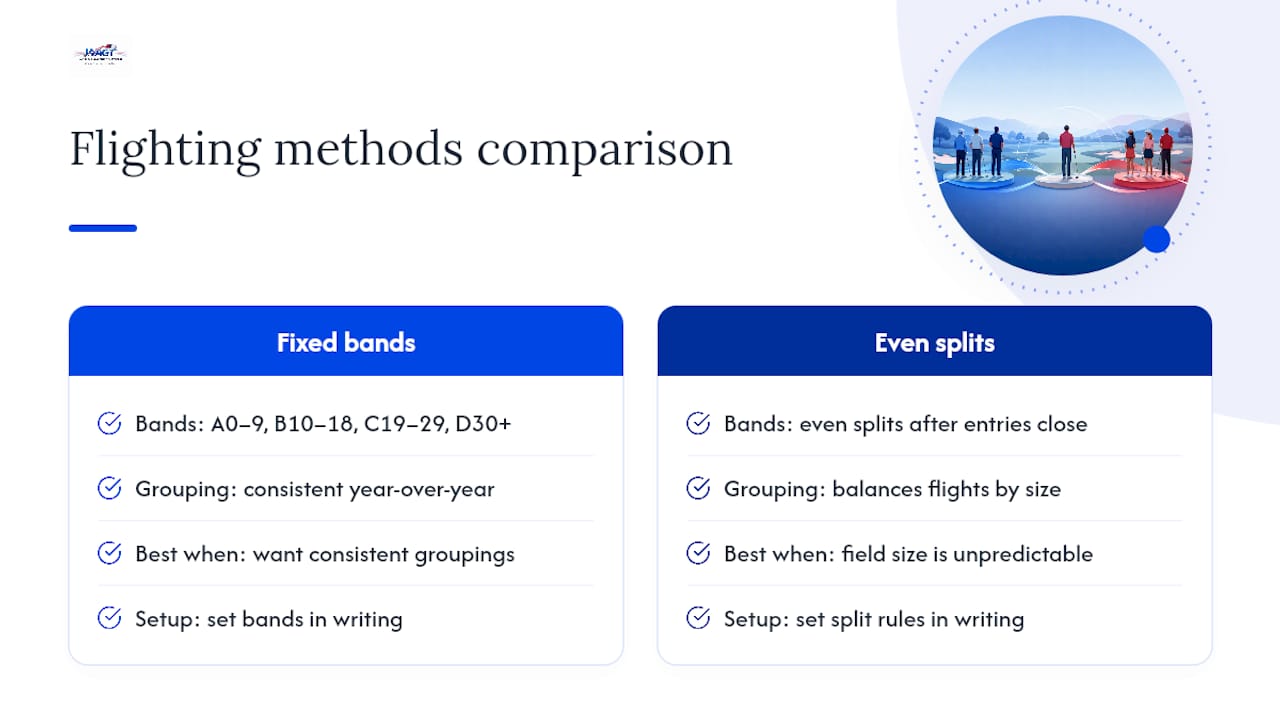
3. Choose your flighting method. Fixed bands (A: 0–9, B: 10–18, C: 19–29, D: 30+) work well when you want consistent groupings year over year. Even splits after entries close work better when field size is unpredictable. Set exact bands or split rules in writing before registration opens.
4. Define tiebreakers. Decide in advance whether playoffs are feasible for your venue and schedule. If not, count-back is your default. Publish the exact sequence on the event page.
5. Configure your scoring platform. Enter the event name, date, course par and hole-by-hole values. Enable net scoring and handicap input. Turn on live leaderboard and score attestation. Set your tiebreak rules inside the platform so results calculate automatically.
6. Configure registration. Set entry limits, fees, and your refund policy. Define prize or purse distribution rules and publish them on the registration page alongside the full scoring terms.
7. Assign roles. Name a scoring manager, a results verifier, and a rules contact before event day. Prepare your scorecard return area and document the procedure for card collection and electronic entry.
Pro Tip: Run a test event in your platform two weeks before the real one. Enter mock scores for three players in different flights and confirm net calculations, leaderboard display, and tiebreak logic all fire correctly before you go live.
Which scoring format fits your amateur event?
Choosing the right format shapes everything from how you configure your platform to how you handle a close finish. Here's how each one works and when to use it.
Stroke Play is the default for competitive amateur events. Every stroke counts, lowest total wins, and net scoring via handicap makes it fair across skill levels. Your platform needs hole-by-hole input, a net column, and flight-based leaderboards. Award both gross and net prizes when your field mixes low and mid-handicappers.
Match Play runs on a bracket system, which means you need an even number of players per flight and a seeding method. Seed by handicap index or qualifying round score. Consolation flights keep eliminated players engaged. Your platform must support bracket management and hole-by-hole win/loss tracking, not just cumulative totals.
Stableford awards points per hole: double bogey or worse earns 0, bogey earns 1, par earns 2, birdie earns 3, eagle earns 4. Stableford scoring encourages aggressive play and softens the damage from a disaster hole, making it a strong choice for higher-handicap or social fields where pace of play matters. Your platform needs per-hole point calculation and a points-based leaderboard, not a stroke total.
Best Ball / Four-Ball is a two-player team format where each player plays their own ball and the team records the lower score on each hole. Scoring aggregation is straightforward, but your platform must support team entries and team-level leaderboards. For tiebreaks, count-back on the team's best-ball score over the last nine holes is standard.
- Scramble works well for corporate or social events. All players tee off, the team selects the best shot, and everyone plays from that spot. It's the most forgiving format and the fastest to score. Tiebreaks typically use the team's combined handicap or a count-back on the scramble score.
- For any team format, confirm your platform supports team scoring rules and can export individual player data separately for handicap purposes.
How do gross vs. net scoring and handicaps actually work?
Gross score is the raw stroke count. Net score is gross minus the player's course handicap, calculated from their USGA Handicap Index and the course's Slope Rating and Course Rating. Net scoring is the mechanism that lets a 20-handicapper compete fairly against a 5-handicapper on the same leaderboard.
Simple net-score example:
A player’s net score is their gross score minus their course handicap, adjusting raw ability for fair competition here A scratch player who shoots 72 wins on net by two strokes, but the 14-handicapper competed on equal terms.
USGA guidance is clear: use the Handicap Index in effect on the competition's start date. If your event spans a revision date, your conditions of competition must specify whether the revised index applies to later rounds.
Flighting approaches:
| Flight | Fixed Band | Even-Split Logic | Best For |
|---|---|---|---|
| A | 0–9 | Top players by index | Competitive low-handicap players |
| B | 10–18 | Middle players | Mid-handicap competitive players |
| C | 19–29 | Middle players | Higher-handicap competitive players |
| D | 30+ | Lower players | Beginner or high-handicap players |
Fixed bands give you consistent groupings and are easier to communicate to players before entries close here. Even splits guarantee balanced flight sizes but require you to wait until registration closes before publishing assignments. Both approaches are USGA-recommended when defined in advance.
Offering both gross and net prizes rewards absolute performance (the low-handicapper who shoots 68) and relative performance (the 22-handicapper who plays the round of their life). Most competitive amateur events use this structure because it keeps both ends of the field invested.
Pro Tip: When displaying net scores on a live leaderboard, show the course handicap used for each player alongside their net total. It removes suspicion and cuts post-round questions in half.
What are the tiebreak and score verification steps?
A close finish handled badly can undo an otherwise clean event. Set these procedures before registration opens, publish them, and never deviate.
- Default count-back sequence. When a playoff isn't feasible, R&A-aligned procedures recommend matching scorecards in this order: best score over the last nine holes, then last six, then last three, then the 18th hole alone. The player with the better score at the earliest differentiating step wins.
- Clarify "last nine" for non-standard starts. If your event uses a shotgun start or a 1 & 10 split, define in your conditions of competition which holes constitute "last nine" (for example, holes 10–18). Ambiguity here is the most common source of post-event disputes.
- Decide on playoffs before the event. If you want a sudden-death playoff for first place, confirm the venue will hold players after scoring closes and identify the playoff hole(s) in advance. State this in the event conditions.
- Score attestation. Playing partners confirm each hole score before the card is submitted. This is the first line of defense against transcription errors.
- Scorecard return. Per USGA scoring procedures, the committee must define exactly when a scorecard is considered returned, whether that's when the player leaves the designated scoring area or when the score is submitted electronically. Define this in writing and post it at the scoring desk.
- Dispute window. Set a time limit (typically 30 minutes after the last group finishes) for filing protests. Require signed scorecards and, for digital entries, timestamped electronic records as evidence. Name the single person with final decision authority.
Pro Tip: Print the tiebreak sequence and scorecard-return rules on a laminated card and post it at the scoring desk. Players who see the rules displayed on-site raise far fewer objections after results are posted.
How do you choose the right scoring platform for your event?
The platform decision comes down to four dimensions: what type of event you're running, which features you actually need, how much admin work you're willing to do, and whether your event needs to count toward official rankings.
Decision dimensions to evaluate:
- Best for: Social and corporate events need low friction and easy registration. Regional competitive amateur events need handicap support, flighted leaderboards, and score attestation. WAGR-counting events need a platform built for that specific ranking integration.
- Required features: Live leaderboard, net/handicap scoring, score attestation, registration and payment collection, results export, and payout or points configuration.
- Pricing shape: Many entry-level apps offer a free tier for small events. Club-level and enterprise platforms charge per event or per player, with admin controls and support scaled accordingly.
- Admin ease: Look for an audit log on score edits, real-time verification, exportable results in standard formats, and published rules and prize distribution settings you can configure before registration opens.
For small club events, a low-friction app that handles registration and a basic leaderboard is usually enough. For regional amateur championships with flights, handicaps, and prize purses, you need a platform that supports all of those simultaneously without manual workarounds. Tools like Golf Genius and 18Birdies serve different points on that spectrum, and PuttScores offers practical tournament configuration including Stripe-based fee collection and custom tiebreak settings.
For events that count toward the World Amateur Golf Ranking, Worldamateurgolftour is the recommended platform. It's purpose-built for WAGR-sanctioned competition, with ranking eligibility, live scoring, tournament administration, and player profile tools all integrated. No other platform in this category combines WAGR integration with the registration, handicap, and results infrastructure that competitive junior and amateur events require.
Must-have admin controls checklist:
- Score editing audit log (who changed what and when)
- Real-time score verification and attestation
- Exportable results in CSV or PDF
- Published rules and prize distribution visible to players
- Configurable tiebreak rules that calculate automatically
What start format and on-site logistics do you need?
How you start the field affects scoring, flights, and playoff feasibility more than most organizers expect.
Shotgun start sends all groups to different holes simultaneously. Every player finishes at roughly the same time, which makes leaderboard updates clean and playoffs logistically straightforward. The tradeoff is that you need enough holes and groups to fill the course, and "last nine" for count-back purposes must be defined by hole number, not by playing order.
Sequential tee times work better for smaller fields or when course availability is limited. Scoring updates trickle in over several hours, which means your live leaderboard will show incomplete rounds for much of the day. Playoffs are harder to schedule because early starters may have left the venue. For guidance on scheduling tee times and shotgun starts, the format choice should be locked in before you configure your platform.
On-site equipment and staffing:
- TV or monitor displaying the live leaderboard at the clubhouse
- Scorer tablets or a dedicated laptop at the scoring desk
- Reliable internet (a cellular backup plan is worth having)
- A clearly marked scorecard return area with a staffed desk
- Printed scorecards with hole-by-hole par values and handicap stroke allocation
Staffing roles on event day should be assigned before the first tee. The scoring manager owns data entry and leaderboard accuracy. The results verifier cross-checks digital entries against signed cards. The rules official handles disputes and interprets the conditions of competition. These three roles can overlap in small events, but each function must be covered by a named person.
Common scoring problems and how to fix them fast
| Problem | Likely Cause | Immediate Fix | Escalation Trigger |
|---|---|---|---|
| Leaderboard not updating | Scores not published or page not refreshed | Check admin "publish" toggle; ask scorers to refresh | Contact platform support with event ID if toggle is on and issue persists |
| Registration link not working | Event not set to "open" in admin | Verify event status in admin dashboard; republish | Platform support if status shows open but link still fails |
| Entry fee not collected | Payment processor not connected or test mode active | Check Stripe/processor connection in settings; confirm live mode | Platform support with payment processor account details |
| Score discrepancy (paper vs. digital) | Transcription error or unsigned card | Cross-check signed scorecard against digital entry; correct with audit log | Escalate to results verifier; signed card is the authoritative record |
| Net score calculating incorrectly | Wrong handicap entered or course handicap not configured | Verify handicap index and course slope/rating inputs; recalculate | Results verifier corrects before results are finalized |
| Tiebreak not resolving automatically | Tiebreak rules not configured in platform | Manually apply count-back using signed scorecards | Document decision in writing; notify affected players |
When you escalate to platform support, have your event ID, the timestamps of the affected entries, and copies of the signed scorecards ready. That information cuts resolution time significantly.
Why fairness and transparency are non-negotiable in amateur events
The USGA and R&A don't just recommend pre-published rules as a courtesy. They reflect decades of adjudication experience showing that disputes almost always trace back to rules that weren't written down before the event started.
USGA guidance on conducting competitions recommends that committees define handicap usage, flighting method, and tiebreak procedures in the conditions of competition, not on the fly. R&A committee procedures specify the count-back sequence as the default when a playoff isn't feasible, precisely because it removes subjectivity from a close finish.
Operationally, the single biggest improvement most organizers can make is to publish rules before registration opens and never change them mid-event. Players who register under a stated set of rules have a reasonable expectation that those rules will govern the result.
What to publish before registration opens:
- Competitive format and whether gross, net, or both are awarded
- Handicap policy (index in effect on start date; index required for entry)
- Flighting method and exact bands or split rules
- Tiebreak sequence and whether playoffs are possible
- Prize eligibility rules and purse distribution
- Protest window and decision authority
The committee should specify when a scorecard is considered returned and provide a dedicated area for score verification to reduce disputes. A quiet, staffed scoring area with a defined return procedure is not a luxury for large events. It's the operational standard that protects your results from challenge. (USGA Scoring Procedures)
A brief communication template for your registration page might read: "This event uses net, flighted stroke play. Players must have a valid USGA Handicap Index. Flights are assigned by handicap band (A: 0–9, B: 10–18, C: 19–29, D: 30+). Tiebreaks are resolved by count-back (last 9, last 6, last 3, 18th hole). Protests must be filed within 30 minutes of the last group finishing. The scoring committee's decision is final."
How to prevent data entry errors during scoring
Accurate scoring starts with how data gets into the system, not with how results are reviewed afterward. Most errors are preventable with a few consistent practices.
Use hole-by-hole entry, not total-score entry. Entering a cumulative score at the end of a round skips the per-hole verification step that catches transposition errors (a 5 entered as a 6, a birdie missed entirely). Every platform worth using supports hole-by-hole input.
Require attestation before submission. When playing partners confirm each hole score before the card is submitted, transcription errors surface immediately rather than after results are posted. Platforms that include attestation cut post-round correction work significantly and improve player confidence in the final standings.

Assign one person per scoring station. Shared login credentials and multiple people entering scores on the same device create version conflicts and audit trail gaps. One scorer per device, one device per station.
Print backup scorecards with pre-filled player names, handicap indexes, and hole pars. When a device fails or connectivity drops, players can complete paper cards without losing any setup information. The signed paper card is always the authoritative record.
Cross-check totals before publishing. Before you push results live, have the results verifier compare the digital total against the signed card for every player in contention. A two-minute check at the top of the leaderboard prevents a public correction.
How to train volunteers and staff on scoring procedures
Scoring accuracy on event day depends almost entirely on preparation done before it. Volunteers who understand the system before they arrive make far fewer errors than those who learn on the job.
Hold a 30-minute briefing the evening before or the morning of the event. Cover the platform login, how to enter scores hole by hole, how to handle an attestation prompt, and what to do when a player disputes a score. Keep it practical and hands-on.
Create a one-page reference card for each scoring station. Include the login credentials, the step-by-step entry process, the tiebreak sequence, and the name and phone number of the scoring manager. Laminate it. Volunteers under pressure don't read manuals; they glance at a card.
Run a mock scoring session with test data. Enter scores for three fictional players, trigger a tiebreak, and walk through the dispute workflow. This surfaces platform quirks before they appear in a live event.
Assign a clear escalation path. Every volunteer should know: if you're unsure, stop and call the scoring manager. Don't guess, don't override, don't delete. The audit log protects everyone, but only if entries are made correctly in the first place.
For detailed role definitions covering the scoring manager, results verifier, and rules official, review the full responsibilities guide before your next event.
How to communicate scoring rules clearly to participants
Players who understand the scoring system before they arrive are easier to manage on event day. Confusion about net scoring, flights, or tiebreaks almost always traces back to rules that weren't communicated clearly at registration.
Send the full scoring terms in the registration confirmation email. Don't link to a separate page and hope players find it. Paste the key rules directly into the email body: format, handicap policy, flight assignments, tiebreak sequence, and protest window.

Post the rules on the event page in plain language. Avoid rules-book language. Write it the way you'd explain it to a first-time competitor: "Your net score is your gross score minus your course handicap. Flights are grouped by handicap index. Ties are broken by count-back starting with the last nine holes."
Send a reminder 48 hours before the event. Include flight assignments, tee times or shotgun hole assignments, the scoring platform link or app download instructions, and the scorecard return location. Players who know exactly where to go and what to do when they finish reduce scoring desk congestion.
Post a summary at the first tee and at the scoring desk.
If you change anything after registration opens, notify all registered players immediately by email. Never update the event page alone and assume players will see it.
What's your contingency plan when scoring breaks down?
Technical failures and disputed scores happen at every level of competition. The organizers who handle them well are the ones who planned for them before the event started.
For platform or connectivity failures:
Have printed backup scorecards at every scoring station before the first group tees off. If your platform goes offline, players complete paper cards. Designate one person to collect and manually enter scores when connectivity is restored. Don't wait for the platform to come back before collecting cards; collect them on schedule and enter later.
Keep a cellular hotspot as a backup internet source. Course Wi-Fi is unreliable. A dedicated hotspot for the scoring desk costs very little and eliminates the most common technical failure point.
Know your platform's support contact before event day. Save the support number or chat link in your phone. When you call, have your event ID, the affected player names, and timestamps of the last successful entries ready.
For disputed scores:
The signed scorecard is the authoritative record. If a digital entry conflicts with a signed card, the signed card governs. This is standard USGA procedure and should be stated explicitly in your conditions of competition.
Set a protest window (30 minutes after the last group finishes is typical) and enforce it. Protests filed after the window closes are not accepted. The scoring committee's decision, made by the named decision authority, is final.
Document every dispute resolution in writing, even brief ones. Note the player names, the disputed hole, the evidence reviewed, and the decision made. This protects the committee and creates a reference for future events.
Why a well-built scoring system is the foundation of competitive integrity
There's a version of this conversation that focuses entirely on software features and platform comparisons. But the real issue is simpler: players compete harder and trust results more when they know the rules were set before the first tee shot.
Every close finish I've seen resolved cleanly came down to one thing: the tiebreak rules were published before registration opened, and everyone knew them. When a two-player count-back goes to the 18th hole and one player wins by a single stroke on that hole, there's no argument because the procedure was never in question. The pre-published rules did the work.
Digital scoring and live leaderboards have made amateur events dramatically more transparent. But the technology only works as well as the setup behind it. A live leaderboard showing incorrect net scores because handicaps weren't configured properly is worse than no leaderboard at all. It creates confusion and erodes trust in the result.
The organizers who run the cleanest events aren't necessarily using the most sophisticated platforms. They're the ones who configured everything correctly before registration opened, trained their volunteers, and published their rules in plain language. The platform is a tool. The setup is the work.
For WAGR-counting events, the stakes are higher still. Ranking points affect college recruiting timelines and professional pathways. Getting the scoring system right isn't just about a clean event day. It's about protecting the integrity of every result that flows into a player's ranking profile.
Worldamateurgolftour: built for competitive amateur events that count
If your event needs to count toward the World Amateur Golf Ranking, the platform has to be purpose-built for that. Worldamateurgolftour is the competitive standard for WAGR-sanctioned amateur events in the United States, combining live scoring, handicap integration, registration, and ranking point tracking in one place.
Here's what the platform gives you as an organizer:
- WAGR event support: Your tournament counts toward official World Amateur Golf Ranking points, giving players a pathway to collegiate and professional visibility.
- Live leaderboards: Real-time scoring with net and gross columns, flight-based views, and score attestation built in.
- Registration and payments: Entry fee collection, refund policy configuration, and prize distribution settings all managed in one dashboard.
- Handicap integration: Net scoring calculated automatically from USGA Handicap Index inputs, with course handicap displayed on the leaderboard.
- Results export: Clean, exportable results for official records, player profiles, and ranking submissions.
Players on the tour also earn rewards redeemable for gear and entry credits, and their profiles are visible to college coaches through the platform's recruiting tools. For junior and collegiate golfers, that combination of competitive credibility and recruiting exposure is what sets Worldamateurgolftour apart from a standard tournament app.
Register your event or explore membership options at Worldamateurgolftour and publish your scoring rules before registration opens.
Sources
These resources are the primary references for USGA and R&A-aligned tournament procedures. Link to them from your event page or include them in your conditions of competition documentation.
- How to Conduct a Competition
- Before the Competition
- Scoring in golf explained
- Scoring procedures — USGA