

The best golf recruiting video runs 3 to 6 minutes and opens with a title card showing your name, graduation year, contact information, and scoring average, then moves through full swings by club, short game, putting, and a short on-course clip. That sequence lets a coach evaluate you in the time it takes to check email between recruiting calls. Everything else in a strong recruiting video is a variation on that spine.
TL;DR:
- Coaches prefer a 3 to 6-minute video with clear sections, including full swings from both down-the-line and face-on angles, to allow quick assessment.
- Filming should be done during soft lighting with minimal background clutter using a smartphone or basic camera, focusing on consistency across angles and shots.
- Including verified tournament results and a scoring average linked with your footage significantly strengthens your credibility and reduces follow-up questions.
- Tailor different video versions for high- and lower-tier programs, highlighting decision-making or consistency based on the coach’s priorities and program focus.
- Keep editing honest, label sections clearly, and avoid copyrighted music; natural sound with minimal captions is best for transparency and appeal.
Table of Contents
- What Should Go in a Golf Recruiting Video Structure?
- What Shots and Angles Convince a Coach?
- How Do You Film a Recruiting Video the Right Way?
- How Should You Edit, Label, and Share the Final Video?
- DIY, Student Videographer, or Professional Editor?
- A Sample Shoot Day: From Warm-Up to Final Cut
- Why Verified Tournament Results Make Your Video Stronger
- How to Tailor Your Video for Different Coaches and Programs
- Showing Athleticism Without Turning It Into a Highlight Reel
- Music, Image Rights, and What You're Legally Allowed to Use
- Adding a Voiceover or Personal Statement Without It Sounding Scripted
- A Real Example: What Changed When One Junior Updated Her Footage
- An Alternative Way to Back Up Your Recruiting Video
- Sources
What Should Go in a Golf Recruiting Video Structure?
College coaches sort through hundreds of prospects a season, and a clear, labeled video saves them time and increases the odds of a real follow-up. That's the whole logic behind the order below. Coaches want to see the same information in the same sequence every time, because it lets them compare you against the next player's video without hunting for context.
Here's a template that fits inside a 4-minute total runtime:
- Title card (10–15 seconds): name, grad year, contact info, scoring average, link to tournament results
- Full swings by club (60-90 seconds): driver, mid-iron, wedge, each from two angles
- Short game (45-60 seconds): chips, pitches, one bunker shot
- Putting (30-45 seconds): short putt, mid-range putt, one lag putt
- On-course clip (45-60 seconds): a full hole or approach sequence showing course management
- Closing slide (5-10 seconds): contact info repeated, coach's phone/email if available
For outreach emails to coaches who haven't heard from you yet, build a tighter 90-second cut using just the title card, three swings, and one on-course clip. Save the full 4 to 6 minute version for coaches who've already responded and want a deeper evaluation.
What Shots and Angles Convince a Coach?
Coaches consistently prefer seeing your swing from both down-the-line and face-on angles, because each reveals something the other hides. Down-the-line shows swing plane and path. Face-on shows tempo, weight shift, and impact position. Showing only one angle makes a coach wonder what you're not showing.
Build your footage around this shot list:
- Driver, 7-iron, wedge — two swings each, down-the-line and face-on
- Short game (chip, pitch, bunker) — filmed tight enough to see contact and spin
- Putting — one short putt, one 15-footer, one lag putt, showing full pre-shot routine
- On-course — a tee shot through to a holed putt, unedited, to prove decision-making
Coaches read routine and speed control as much as ball flight, so don't cut away before the follow-through or the putt drops.
Pro Tip: Film three to four reps of each swing and keep only the two most consistent takes. A single "perfect" swing looks staged; two solid, repeatable swings from the same angle look real.
How Do You Film a Recruiting Video the Right Way?
You don't need a production budget to get usable footage. A smartphone on a tripod or gimbal covers the swing and short-game shots just fine; an action camera mounted low and behind the ball adds a second angle without a second camera operator. A mirrorless camera with a zoom lens helps for on-course work where you need distance from the player, and a launch monitor screen capture (TrackMan, Trackman-style overlays, or similar) is a nice add if you already own one, but it's optional, not required.
Before you shoot, run through this checklist:
- Shoot at 1080p minimum, 4K if your device supports it, and use 60fps for swing sequences so slow motion stays smooth
- Keep the camera at a consistent distance for each angle so swings are comparable across clips
- Film during soft morning or late-afternoon light; avoid high-noon shadows across the face
- Use a plain background (tree line, empty fairway) rather than a cluttered driving range mat area
- Check with your course's pro shop or head professional before setting up a tripod on the course; most clubs are fine with it but appreciate a heads-up
- Silence notifications and check wind noise on your microphone before rolling
How Should You Edit, Label, and Share the Final Video?
Editing should build trust, not manufacture it. Keep cuts honest: no deceptive slow-motion that hides a hitch, no trimming a miss out of an on-course sequence. Label every section clearly with on-screen text so a coach never has to guess what club or shot type they're watching.
A few concrete choices matter here:
- Export as .mp4 using H.264 compression, which plays cleanly across devices and hosting platforms
- Keep resolution at 1080p or 4K with a bitrate high enough to avoid pixelation during swing playback
- Host on unlisted YouTube or a private Vimeo link rather than public search, so only people with the link can view it
- Use a coach-friendly file name like FullName_GradYear_ClubRole.mp4 for anything you send as a download
- Repeat your title card at the closing slide with the same contact details and a link to your full player profile
If you want a shareable social cut, a vertical 9x16 clip works for Instagram or Twitter, but treat it as a bonus, not a replacement for the primary landscape edit coaches will actually evaluate.
DIY, Student Videographer, or Professional Editor?
Most junior golfers start with a phone, a family member holding the tripod, and free editing software, and that's genuinely enough for a first version. Simple, minimally edited footage with clear text callouts and no dialogue works well for the outreach stage, and it costs nothing but time.
If you want a more polished result, expect these rough bands:
- Basic edit (DIY or student videographer): free to around $50, covering filming help and simple cuts
- Full package with a stats slide: paid services often bundle an intro slide, 8 to 15 clips, a stats slide, and a contact slide at modest entry-level pricing
- Add-ons like launch monitor data or multi-angle setups: push the price higher but add visible credibility
Before paying anyone, ask for a sample reel, a turnaround estimate, confirmation you keep rights to your raw footage, and private hosting so the video isn't sitting on public search.
A Sample Shoot Day: From Warm-Up to Final Cut
A single 90 to 120-minute session at the range and course can produce everything you need.
- 0 to 20 minutes: warm up fully, then set up camera angles for driver and mid-iron shots
- 20 to 50 minutes: film driver, 7-iron, and wedge swings from down-the-line, then reposition for face-on and repeat
- 50 to 75 minutes: move to the short game area for chips, pitches, and one bunker shot, then to the putting green
- 75 to 105 minutes: play one hole start to finish for your on-course sequence, filming tee shot, approach, and the putt
- 105 to 120 minutes: review footage on-site to confirm angles and audio are usable before you leave
Editing maps directly onto that schedule: title card first, then the driver/iron/wedge clips in club order, short game and putting next, on-course clip last, closing slide to finish.
Why Verified Tournament Results Make Your Video Stronger
A swing looks good on camera. A scoring average with a tournament link proves it under pressure. Pairing your footage with verified results and a scoring average cuts down the back-and-forth a coach would otherwise spend confirming your level of play. Linking to a WAGR event schedule or ranking page with the event name and date lets a coach check your competitive record in seconds instead of asking you for it later.
That's exactly the kind of context worth building into your player profile and title card. A recruiting video without a results link asks a coach to trust you. A recruiting video with one gives them proof.
How to Tailor Your Video for Different Coaches and Programs
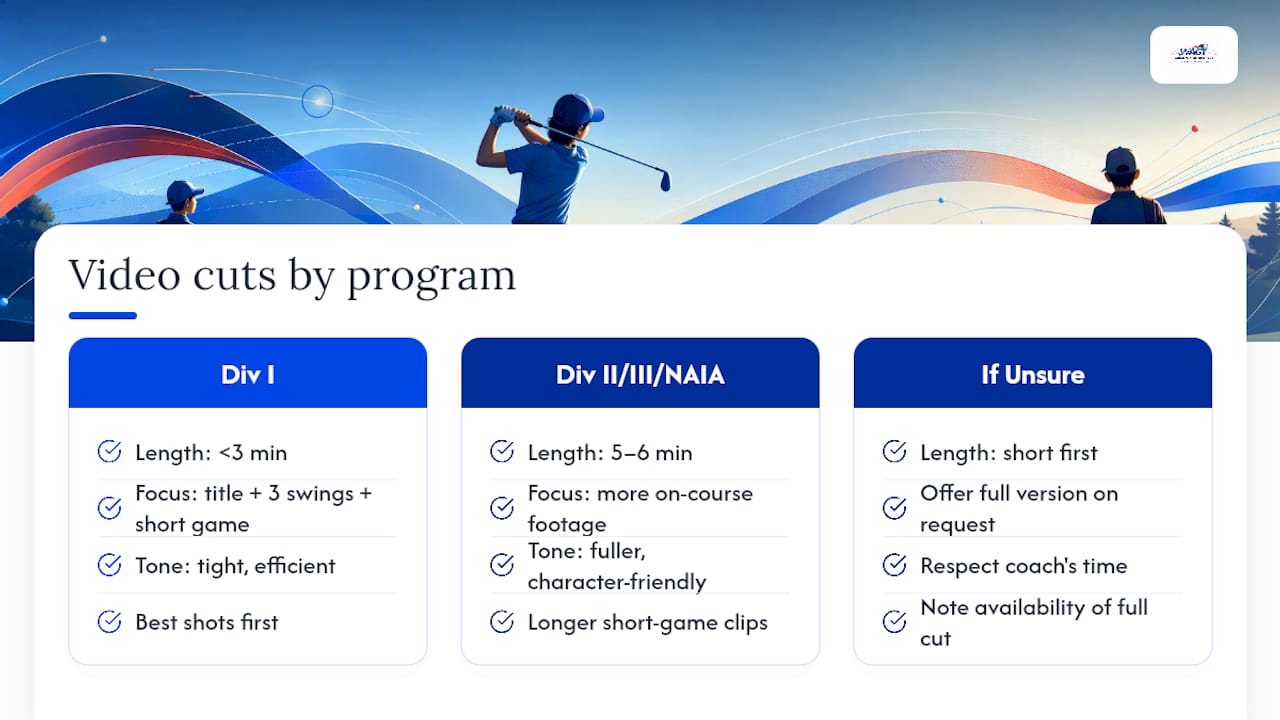
Not every program watches your video the same way, so build two or three cuts instead of one universal file. A Division I coach recruiting for a top-25 program is usually screening dozens of players a week and wants the tight, efficient version: title card, three club swings, short game, on-course clip, done in under 3 minutes. Anything longer risks getting closed before your best shot plays.
A Division II or III coach, or an NAIA program building a roster from scratch, often has more time per prospect and appreciates the fuller 5 to 6 minute cut with additional on-course footage and a longer look at your short game. These programs frequently value character and coachability alongside pure ball-striking, so a short, honest voiceover about your work ethic can land better here than it would with a Power Five staff moving fast through a stack of files.
If you already know a coach's system or philosophy, adjust which clips you lead with. A program known for aggressive, low-scoring play benefits from seeing your on-course decision-making up front. A program that emphasizes fundamentals and consistency responds better to a longer, unedited look at your full-swing sequence early in the video.
When in doubt, send the shorter cut first with a note offering the full version on request. That respects a coach's time while signaling you have more depth to show, and it lets you learn which version actually gets responses.
Showing Athleticism Without Turning It Into a Highlight Reel
Golf recruiters increasingly look past pure swing mechanics toward how a player moves, and that's worth addressing directly rather than hoping it comes through by accident. A short segment, 15 to 20 seconds, showing you carrying your own bag, moving briskly between shots, or doing a simple mobility drill communicates conditioning without turning your recruiting video into a fitness reel.
Course walking pace matters more than most juniors realize. Coaches notice players who move with purpose between shots versus players who drag through a round, because pace of play reflects mental sharpness as much as physical stamina. If your on-course clip naturally shows brisk, confident movement between the tee and your ball, you don't need a separate segment at all.

Avoid the temptation to bolt on unrelated highlight footage, gym clips set to music, or a full workout montage. That content belongs on a separate social account, not inside a video whose job is proving you can play competitive golf. A single sentence in your voiceover, mentioning a training routine or a specific fitness benchmark, does more work than 30 seconds of gym footage a coach didn't ask to see.
Music, Image Rights, and What You're Legally Allowed to Use
Skip copyrighted music entirely unless you have an explicit license, because platforms like YouTube and Vimeo actively scan uploads and will mute, flag, or take down a video that uses commercial tracks without permission. That's a real risk during recruiting season when a coach clicks a link and gets a muted or removed video instead of your swing.
The safer, and often more effective, choice is no music at all. Many strong recruiting videos rely on natural sound, letting a coach hear ball contact and use text overlays instead of a soundtrack. If you want background music, use royalty-free tracks from a licensed library and keep the volume low enough that it never covers swing sound or your voiceover.
Image rights are simpler for junior golfers filming themselves on a course they're a member of or a guest at, but always confirm with the course's pro shop before setting up equipment, especially a tripod or gimbal rig near other groups. If another golfer or a coach appears in your footage, it's good practice to get a quick verbal okay before publishing, particularly for anything posted publicly rather than shared through a private link.
Adding a Voiceover or Personal Statement Without It Sounding Scripted
A short voiceover works best when it's brief, specific, and placed at the beginning or end, not layered over every clip. Ten to fifteen seconds introducing yourself over the title card, stating your name, grad year, and one sentence about your goals, sets a personal tone before the golf footage takes over.
Avoid narrating every swing. A coach watching your video wants to see your golf, not hear commentary on it. If you want to add context, a single caption on screen (club, distance, or shot type) does the job without competing with swing sound.
Save any personal statement for the closing slide or a short clip at the very end, after the on-course footage. A sentence about your work ethic, your goals for a program, or why you're drawn to their school reads as sincere in that spot. The same words dropped in the middle of your swing reel just interrupt the footage a coach came to evaluate.
Keep the tone conversational and specific rather than rehearsed. "I want to compete at the highest level I can while studying engineering" tells a coach something real. A generic line about loving the game tells them nothing they don't already assume.
A Real Example: What Changed When One Junior Updated Her Footage
One junior golfer replaced a two-year-old highlight reel with fresh footage that added a scoring average and tournament link to the title card. Coach responses picked up within weeks. The lesson: outdated footage without verification undersells a player more than any swing flaw does.
— Gene
An Alternative Way to Back Up Your Recruiting Video
A recruiting video only proves so much on its own. What actually convinces a coach is footage backed by results they can check in seconds. Worldamateurgolftour exists for exactly that gap: it's how junior, collegiate, and amateur golfers turn tournament rounds into a verifiable record that sits right alongside their video.

Membership provides access to WAGR-counting events and a player profile that tracks your scoring average, tournament finishes, and ranking points over time. That's the same information coaches look for on a title card, already organized and linkable, so your video's claims aren't just claims. Pair a fresh recruiting video with an active player profile and a results link, and you've given a coach everything they need to move you from "interesting" to "worth a phone call."
If you're planning your next few months of competitive golf and want events that count toward your ranking while building that record, check the tournament schedule and membership details and see which events fit your calendar.
Sources
- How to build a golf recruiting video — RPS Academies
- Golf showcase college recruitment video — PL Visuals (2024)
- How to get recruited for college golf — NCSA
- College Recruiting Videos — service example and sample deliverables