

Lock your date and course first. Everything else in your golf club event budget planning guide flows from those two decisions. Before you call a caterer or print a single sponsor packet, confirm your venue, secure the deposit terms, and form a small steering committee. From that foundation, build a one-page budget showing your cost-per-golfer, a 10–15% contingency reserve sized to protect against unexpected costs, and a sponsor forecast. Research-backed planning benchmarks suggest sponsorships can offset roughly 20–40% of total event costs when packages are structured with clear deliverables. For first-year charity events, start planning 6–9 months out; a compressed 4–5 month window works for smaller member-only outings.
Your downloadable budget workbook (linked in the Sources section below) contains six tabs: a master P&L, a line-item tracker using the three-column method (budgeted/committed/paid), a sponsor tracker, an invoices and deposits log, a month-by-month timeline with task owners, and a day-of run sheet. Populate the event basics first, then fixed costs, then variable per-player items.
Day-one checklist:
- Call the course, confirm available dates, and ask for deposit and cancellation terms in writing
- Form your steering committee (tournament chair, treasurer, sponsorship lead)
- Open the workbook and enter your three-column budget with fixed costs only
- Set a target field size and calculate a preliminary cost-per-golfer
- Begin sponsor outreach immediately — corporate approvals take several weeks to a few months
Pro Tip: Popular courses book peak weekend dates 12–18 months in advance. If your target venue is competitive, call before you finalize any other detail.
Key Takeaways
A successful golf club event budget requires locking the course and date first, tracking every dollar across three columns, and treating sponsor revenue as a planned line item rather than a bonus.
| Point | Details |
|---|---|
| Lock date and course first | Popular venues book 12–18 months out; confirm deposit and cancellation terms before any other commitment. |
| Use the 3-column budget method | Track every line item as budgeted, committed, and paid; update the committed column the moment a vendor confirms a price. |
| Build in 10–15% contingency | Outdoor golf events carry weather and headcount risk; size contingency at the higher end of the 10–15% range. |
| Forecast sponsors at 20–40% offset | Structured packages with clear deliverables can offset 20–40% of total event costs; model at the conservative close rate. |
| Worldamateurgolftour supports club hosts | The platform provides registration, live scoring, WAGR-counting events, and operational templates that reduce budget risk for club organizers. |
Table of Contents
- What does a complete golf club event budget planning guide cover?
- How do you build and manage the event budget from day one?
- What does a 6–9 month event planning timeline look like?
- How do you forecast and structure sponsorship revenue?
- How do you set player fees and calculate event ROI?
- What are the best ways to cut costs and add revenue?
- What contract terms and insurance items should you budget for?
- How many staff and volunteers do you need on event day?
- How do you use the downloadable budget workbook?
- How do you close the books and prepare for next year?
- What experienced tournament chairs do differently
- Worldamateurgolftour gives your club a proven event platform
- Sources
What does a complete golf club event budget planning guide cover?
Every well-run golf tournament budget starts with the same architecture: fixed costs that don't move regardless of headcount, and variable costs that scale with your field. Classifying costs this way lets you model P&L scenarios at 70%, 100%, and 125% of your target field before registration opens.
Core budget categories and U.S. cost ranges
| Category | Fixed or Variable | Low Range | Mid Range | High Range |
|---|---|---|---|---|
| Green fees and cart rental | Variable (per player) | $45/player | $90/player | $175/player |
| Food and beverage (on-course + dinner) | Variable | $35/player | $65/player | $120/player |
| Awards and prizes | Fixed/Variable | $500 total | $1,500 total | $5,000+ total |
| Player gifts (sleeve of balls, bag tag) | Variable | $15/player | $30/player | $60/player |
| Signage and printing | Fixed | $300 | $800 | $2,000 |
| Staffing and volunteer expenses | Fixed/Variable | $200 | $600 | $2,000 |
| AV and production | Fixed | $0 | $500 | $2,500 |
| Marketing and registration tech | Fixed | $100 | $400 | $1,200 |
| Insurance and permits | Fixed | $250 | $600 | $1,500 |
| Shipping and transport | Fixed | $0 | $200 | $800 |
| Contingency (10–15%) | Fixed | 10% | 12% | 15% |
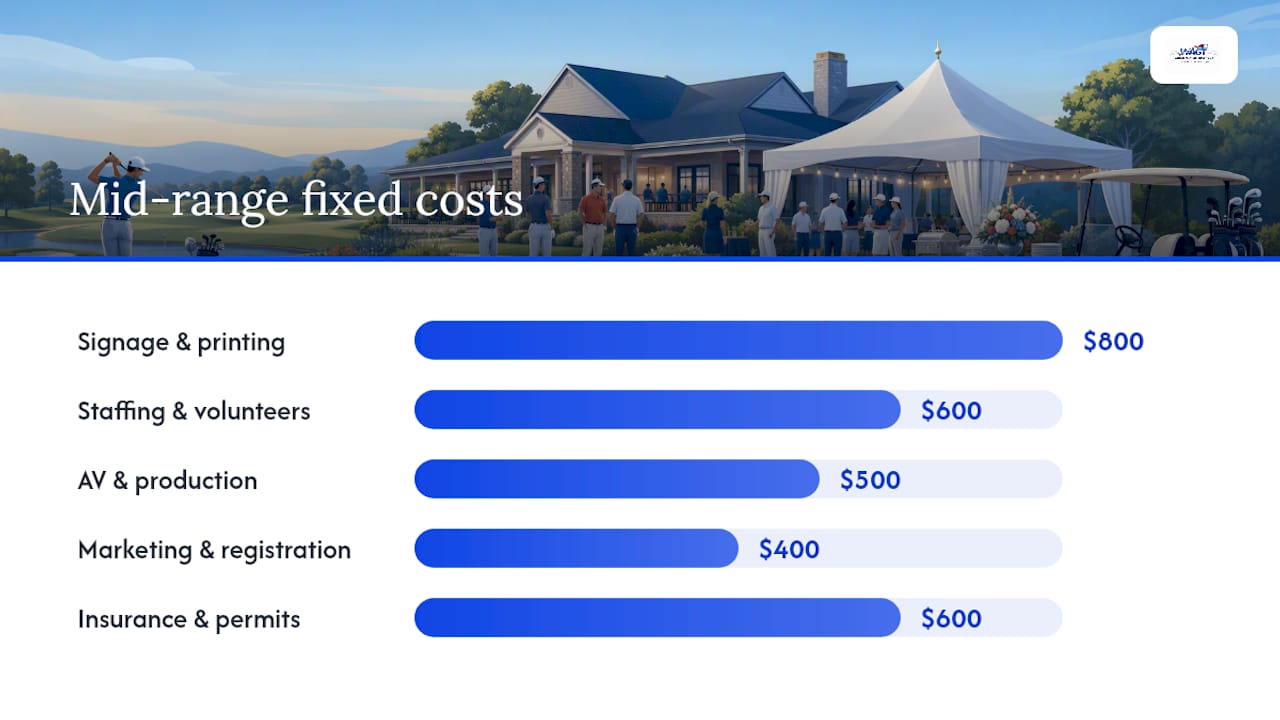
A full-scale golf outing planning kit treats a sell-out field as approximately 120 to 144 players and lists green fees, carts, food and beverages, prizes, promotional merchandise, printing, and volunteer needs as the key line items.
Per-player cost build-ups by event tier
Budget tier (member outing, minimal frills): $95–$130/player Standard tier (charity scramble, boxed lunch on-course, sit-down dinner): $160–$220/player Premium tier (championship-caliber course, full catering, premium gifts): $260–$350/player
Hidden costs that organizers frequently miss include mandatory course security fees, post-event cleaning charges, cart path damage waivers, and overtime for course staff if your shotgun start runs long. Ask the course coordinator for a complete fee schedule in writing before you sign anything.
How do you build and manage the event budget from day one?
The three-column budget method — budgeted, committed, and paid — is the single most effective tracking framework for golf events. "Budgeted" is your estimate. "Committed" is a signed contract or confirmed quote. "Paid" is a cleared invoice. Never let a line item sit in "budgeted" past the point where a vendor has confirmed a price.
Step-by-step budgeting process
- Open your workbook and enter event basics — date, venue, target field size, and format (shotgun, tee times, scramble, stroke play).
- List all categories first, then line items — resist filling in numbers until every category is named. Missing a category is more costly than a wrong estimate.
- Get three quotes for every major vendor — catering, AV, trophies, and photography. Use the middle quote as your planning figure, per the three-quote rule.
- Classify each line item as fixed or variable — green fees move with headcount; signage does not.
- Add your contingency line — size it at 10–15% of total projected costs. Eventbrite's guidance places contingency ranges at roughly 5–25% depending on event risk; outdoor golf events with weather exposure warrant the higher end.
- Model three P&L scenarios — 70% of target field (conservative), 100% (expected), and 125% (stretch). These give your committee clear go/no-go thresholds.
- Assign a budget owner and set a review cadence — weekly updates in the six weeks before the event, biweekly before that. One person owns the spreadsheet; others submit changes through them.
Pro Tip: Record the vendor name, contact, quote date, and quote expiration in the "committed" column notes. Quotes expire, and a caterer who quoted $58/head in March may reprice in August.
Cash flow matters as much as the total budget. Most venues require a deposit of 25–50% at signing, with the balance due 30–60 days before the event. Map every payment deadline on the timeline tab so your treasurer never misses a due date.
What does a 6–9 month event planning timeline look like?
A practical planning cadence locks the slow-moving pieces first, then layers in sponsors and registration. That sequence prevents first-year events from getting overwhelmed by competing priorities. GolfGamesHub recommends starting 6–9 months out for a standard tournament, with the date and course confirmed as the first two locked items.
Month-by-month milestone schedule
Month 9 (or as early as 12 for premium venues): Reserve course, confirm deposit and cancellation terms, form steering committee, open workbook.
Month 8: Build initial budget with fixed costs. Identify sponsorship targets. Draft sponsor packages. Begin outreach to title and premier sponsors.
Month 7: Open player registration. Finalize sponsor packages and send proposals. Confirm insurance coverage.
Month 6: Follow up on sponsor commitments. Confirm catering vendor and get a signed contract. Order long-lead items: trophies, customized gifts, and branded merchandise.
Month 4–5: Confirm AV and photography vendors. Finalize hole assignments and contest holes. Update budget with committed figures.
Month 2–3: Confirm final headcount deadline with caterer (typically 5–7 business days before the event). Send pairings and tee assignments. Confirm volunteer roles.
Week of event: Confirm all vendor arrival times. Pack station kits. Print scorecards, pairing sheets, and signage. Brief volunteers.
Day of event run sheet (shotgun start example):
- 6:00 AM: Setup crew arrives, signage placed, registration table stocked
- 7:00 AM: Registration opens, player check-in begins
- 8:30 AM: Player meeting, rules briefing, contest hole announcements
- 9:00 AM: Shotgun start
- 2:00–3:00 PM: Estimated finish, scoring collection begins
- 3:30 PM: Awards ceremony, sponsor recognition, raffle/auction close
- 5:00 PM: Teardown begins, vendor checkout, leftover materials secured
For member-only outings, a 4–5 month compressed schedule works when the course is already familiar, the field is capped at 60 players, and no major sponsorship outreach is required.
Pro Tip: Order trophies, engraved gifts, and custom apparel no later than Month 6. Most vendors need 3–4 weeks minimum; rush fees can add 20–30% to the line item.
How do you forecast and structure sponsorship revenue?
Treat sponsorship as a planned budget line, not a bonus. Structured sponsor packages with clear deliverables can offset 20–40% of total event costs for mid-size tournaments. That means a $20,000 event budget could realistically carry $4,000–$8,000 in sponsor revenue if packages are designed and sold correctly.
Sponsor tier structure
- Title sponsor ($2,500–$7,500): Naming rights, logo on all materials, banner at registration and awards, verbal recognition throughout the day, foursome included
- Premier sponsor ($1,000–$2,500): Logo on cart signs and scorecards, banner at one featured hole, two player entries
- Hole sponsor ($250–$500 per hole): Signage at one hole, name in program and pairing sheet
- In-kind sponsor (value varies): Donated prizes, food, beverages, or player gifts recorded at fair market value in the P&L
For your forecast, use three close-rate scenarios: conservative (50% of proposals close), expected (70%), and optimistic (90%). Apply those rates to your pipeline total to get a sponsor revenue range for each P&L scenario.
Start sponsor outreach 4–6 months before the event and build in several weeks to a few months for corporate approval cycles. A sponsor who agrees in principle in Month 7 may not have a signed check until Month 5.
Fulfillment calendar: Logo artwork due 8 weeks before event (for signage production). Signage delivered to venue 48 hours before event. Post-event sponsor report with photos and impressions within 14 days of the event.
Pro Tip: When pitching corporate sponsors, quantify their ROI: estimated impressions, player demographics, and media reach. Sponsors who see measurable value renew. Those who get a banner and a thank-you email rarely do.
How do you set player fees and calculate event ROI?
The formula is straightforward. Cost per golfer = total projected expenses divided by expected players. Your player fee = cost per golfer plus your target margin or fundraising goal, minus the per-player sponsor offset.
Worked example at the standard tier, 100-player field:
- Total projected expenses: $18,000 (including 12% contingency)
- Sponsor revenue (expected scenario): $5,400 (30% offset)
- Net cost to cover: $12,600
- Cost per golfer: $126
- Target fundraising margin: $50/player
- Player fee: $176
At 70% attendance (70 players), net cost to cover rises to $15,600 and cost per golfer climbs to $223 before margin. That's why modeling the conservative scenario before setting fees protects you from a shortfall.
For charity events, a common planning target is a 2:1 return on direct event costs. If your direct costs (excluding donated labor) are $12,000, your fundraising goal is $24,000 gross. Player fees, sponsorships, and add-on revenue all count toward that gross figure.
Payment processing fees (typically 2.5–3.5% for online registration platforms) should be built into the per-player price or absorbed as a fixed cost. Refund policies should be stated clearly at registration: most organizers offer full refunds up to 30 days out, partial refunds up to 14 days, and no refunds inside two weeks.
Early-bird pricing (a $20–$30 discount for registrations in the first 30 days) improves cash flow and gives you an early read on field size before you commit to catering minimums.
What are the best ways to cut costs and add revenue?
Cost savings and revenue add-ons work best when they're planned into the budget from the start, not improvised on-site.
Cost-saving tactics:
- Negotiate a bundled F&B package with the course rather than using an outside caterer — courses often discount when they control both the round and the meal
- Share signage production across multiple events or with a co-hosting club to split fixed print costs
- Use boxed lunches on-course and reserve the premium sit-down dinner for title and premier sponsor tables only
- Source player gifts through in-kind sponsor trades rather than cash purchases; record the fair market value in the P&L as both a revenue line and an expense line
- Ask vendors for a 5–10% discount in exchange for logo placement on event materials
High-margin revenue add-ons to budget:
- Mulligans ($5–$10 each, sold in packs of two at registration)
- Putting contest or closest-to-the-pin entry fees ($10–$20/player)
- Raffle tickets ($5–$25 each, with donated prizes)
- Silent auction (net margin depends on item quality; in-kind donations are pure margin)
- Premium foursome upgrades (priority tee time, gift bag upgrade, reserved dinner table)
- Branded merchandise (hats, towels, ball markers at $15–$40 retail)
For prize and gift structure guidance, including typical spend ranges and in-kind sourcing, your workbook's awards tab gives a starting framework you can adjust by tier.
Pro Tip: In-kind donations for player gifts and hole prizes reduce your cash outlay without reducing perceived event quality. A sleeve of premium balls donated by a local pro shop costs you nothing and lands well with players.
What contract terms and insurance items should you budget for?
Hidden fees and vague contract language are the most common source of budget surprises in golf events. Before signing any vendor agreement, your treasurer should check for these items.
Contract checklist:
- Deposit amount, due date, and refund conditions if the event cancels
- Cancellation policy (course and catering minimums, notice periods)
- Shotgun start blackout windows or tee-time restrictions
- Overtime charges for staff if the round runs past a set hour
- Cleanup and course restoration fees (often not listed in the headline quote)
- Mandatory security or marshal requirements and their costs
- Liability assignment for property damage or player injury
Insurance must-haves:
- General liability coverage ($1M minimum per occurrence is standard for most U.S. venues)
- Hole-in-one contest insurance if you're offering a prize of $5,000 or more
- Event cancellation or weather insurance for larger events (typically 1–3% of total event budget as a premium)
For a full safety and staffing requirements checklist, including medical staff and security considerations that carry budget implications, review your venue's specific requirements before finalizing the insurance line.
Red flags to watch for: A vendor who won't provide a written quote, a course contract that references "standard fees" without itemizing them, and sponsor agreements that lack fulfillment deadlines. Handshake deals belong on the golf course, not in your budget.
Pro Tip: If an invoice arrives higher than the signed quote, escalate immediately in writing. Reference the contract line item and the original quote date. Most vendors will honor the signed figure; those who won't are telling you something important.
How many staff and volunteers do you need on event day?
Staffing requirements scale with field size, and underbudgeting for day-of labor is one of the most common hosting mistakes organizers make.
| Field Size | Volunteers Needed | Paid Roles Recommended |
|---|---|---|
| Up to 60 players | 6–8 | Scoring tech or AV (1) |
| 60–120 players | 10–14 | AV tech, registration lead (2) |
| 120+ players | 16–22 | AV tech, scoring, photography (3–4) |
Core volunteer roles: Tournament chair, logistics lead, registration (2–3 people for fields over 80), hole monitors for contest holes, scorers, setup and teardown crew, and a course floater who handles real-time issues.
Budget for volunteer shirts ($15–$25 each), meals, and a small incidentals fund ($100–$200) for last-minute supply runs. Budgeting for professional AV and scoring ensures event quality at the awards ceremony, where a technical failure in front of sponsors is costly in ways that don't show up on a spreadsheet.
Logistics items to include in the budget: Cart signage, scorecards, pairing sheets, registration hardware (tablet or laptop, card reader), and a contingency materials kit (extra pens, tape, zip ties, extension cords).
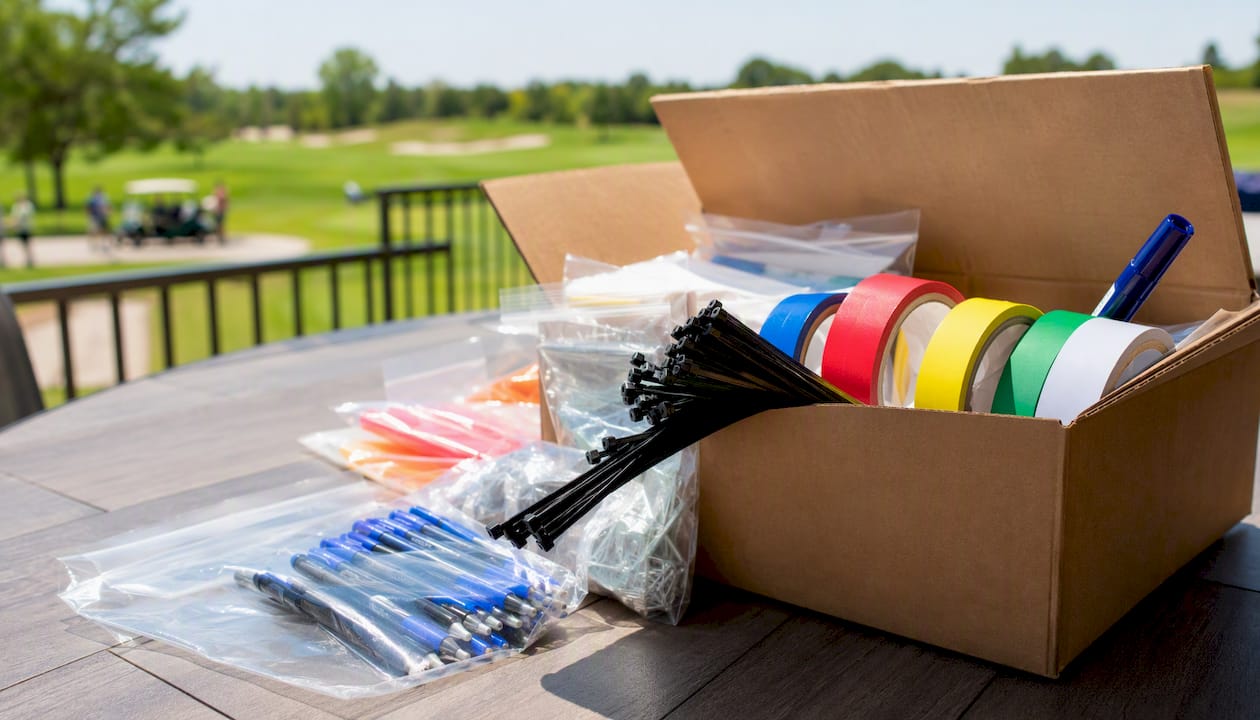
Pro Tip: Pack labeled station kits the day before the event: one box for registration, one for each contest hole, one for the awards table. Budget 2–3 hours and one dedicated person for packing and transport. Scrambling for supplies on the morning of a shotgun start costs you more than the materials.
How do you use the downloadable budget workbook?
The workbook has seven tabs, each serving a distinct function in your golf tournament planning process.
Tab-by-tab walkthrough
- Overview/P&L tab — Enter event name, date, target field size, and format. The P&L auto-calculates across three attendance scenarios once you populate the line-item tab.
- Line-item budget tab — Three columns: budgeted, committed, paid. Enter every category and line item here. Color-code pending items yellow, committed items green, and overages red.
- Sponsor tracker tab — List each prospect, package tier, ask amount, status (prospect/proposed/committed/paid), and fulfillment deadlines. Link to the signed contract in the notes column.
- Invoices and deposits tab — Log every payment made and due, with vendor name, invoice number, amount, due date, and payment date. Your treasurer lives here.
- Timeline and task owner tab — Month-by-month milestones with an assigned owner and a status column. Update weekly in the final six weeks.
- Day-of run sheet tab — Hour-by-hour schedule with role assignments, contingency triggers (rain delay protocol, scoring dispute process), and teardown checklist.
- Post-event reconciliation tab — Compare budgeted vs. actual for every line item, calculate net raised, confirm sponsor deliverables, and log lessons learned for next year.
First-use steps
- Populate event basics on the Overview tab
- Enter all fixed costs on the line-item tab before adding variable items
- Add variable per-player costs and link them to your field size cell
- Input sponsor commitments as they close, moving them from "budgeted" to "committed"
- Run the three attendance scenarios and confirm your player fee covers the conservative case
Common pitfalls: Forgetting to add payment processing fees (2.5–3.5%) to the per-player cost, not recording in-kind donations at fair market value, and failing to update the committed column when headcount changes after the catering deadline. Continuous budget updates are what separate organizers who finish on budget from those who don't.
How do you close the books and prepare for next year?
Post-event reconciliation is where good organizers separate themselves from great ones. Within two weeks of the event, complete this checklist.
Post-event checklist:
- Pay all outstanding invoices and confirm receipt with vendors
- Reconcile every line item: budgeted vs. committed vs. actual paid
- Calculate net raised (gross revenue minus total expenses) for fundraising events
- Confirm all sponsor deliverables were met (logos placed, mentions made, reports sent)
- Send sponsor fulfillment reports within 14 days: include photos, estimated impressions, headline P&L, and a thank-you note from the tournament chair
- Archive the completed workbook with all vendor contracts linked
Variance analysis by category is the most useful input for next year's budget. If catering ran 18% over estimate, either your quote process needs tightening or your headcount model was off. If signage came in under, you have room to upgrade next year. Record the variance and the reason in the lessons-learned tab.
Transparent financial reporting to your club and sponsors builds the credibility that wins future support. Sponsors who receive a clear fulfillment report with measurable outcomes are far more likely to renew. Clubs that publish net results (even in summary form) to members generate more volunteer engagement the following year.
For examples of successful hosted tournaments and the revenue-generation lessons they produced, reviewing real event outcomes helps calibrate your own benchmarks before you build next year's budget.
What experienced tournament chairs do differently
The most common mistake I see in first-year event budgets is treating the sponsor forecast as aspirational rather than structural. Experienced chairs build the sponsor line into the budget at the conservative close rate and refuse to approve expenses that depend on the optimistic scenario closing. That discipline alone prevents most of the cash-flow crises that derail charity events in their second year.
A seasoned chair also keeps a "no-surprises" vendor list: three vendors per major category who have delivered on quote, on time, in previous years. That list is worth more than any negotiation tactic because it eliminates the risk of a vendor repricing after you've committed to a field size.
Weekly budget reviews in the final six weeks aren't bureaucratic overhead. They're the mechanism that catches a catering minimum you forgot to adjust when registration hit 85 instead of 100. Present budget updates to your volunteer committee in a single-page format: total budgeted, total committed, total paid, and variance to plan. Volunteers don't need a spreadsheet; they need a number and a trend.
The one operational detail that protects budget more than any other is a detailed vendor statement of work (SOW) that ties payment milestones to deliverables. A caterer who gets 50% upfront and 50% on the day of the event has every incentive to deliver. A caterer who gets 100% upfront has less. Negotiate staged payments tied to deliverables on every contract over $1,000.
Worldamateurgolftour gives your club a proven event platform
Running a WAGR-counting tournament doesn't have to mean building your operational infrastructure from scratch. Worldamateurgolftour partners with golf clubs to host sanctioned amateur events, bringing a tested registration platform, live scoring, tournament management support, and sponsor packaging frameworks that reduce planning friction from day one.
For club organizers, the practical budget advantage is real: access to a membership-driven player pool improves registration certainty, which is the single biggest variable in your P&L model. Worldamateurgolftour's operational templates and vendor relationships mean you're not starting from a blank spreadsheet. Events hosted through the platform count toward WAGR, which raises sponsor value and player participation rates simultaneously.
If your club is ready to host a competitive, professionally run event that delivers measurable value to players and sponsors alike, visit Worldamateurgolftour to explore hosting options and connect with the team about your next event.
Sources
The benchmarks and timelines in this guide draw from the following sources. Each one is worth bookmarking for your planning workbook.
- The Complete Event Budget Guide 2026 (Free Templates) | EventMobi
- Psp
- Golf Tournament Planning Checklist and Timeline | GolfGamesHub
- Event Budgeting guide | Cvent blog
- Event budget guide | Eventbrite
- How to Create Event Budgets That Actually Work | Abastio
- How to Run a Golf Tournament: Step-by-Step Guide | ParTeeOf18
- Events
For high-variance line items (AV, catering, trophies), always validate the ranges above with at least three local vendor quotes. Cost of living and market conditions vary significantly across U.S. regions. Keep links to all signed vendor contracts in the invoices tab of your workbook so your treasurer and tournament chair can reference them instantly if an invoice differs from the quote.
The golf club marketing tournament checklist and the amateur golf sponsorship criteria guide from Worldamateurgolftour provide additional month-by-month scheduling detail and sponsor package frameworks that complement the workbook tabs described in this guide.